Tutorial 3: Building UI with Components
Buildpad’s UI component library provides two high-level components that eliminate most of the boilerplate for CRUD interfaces:
CollectionList— A paginated, filterable, sortable table that fetches data directly from your DaaS collection.CollectionForm— A full CRUD form that auto-renders the correct input for every field type in your collection.
In this tutorial you’ll walk through the /content/tasks list page and the /content/tasks/[id] detail form that were already generated by Tutorial 2, understand how they work, and learn how to customise them.
By the end you’ll have:
- A working
/content/tasksroute showing all tasks in a filterable, sortable table - A
/content/tasks/[id]route with a full create/edit/delete form - Session-aware UI using the
useAuthhook
Prerequisites
- Completed Tutorial 2: Collections & Data.
- The
taskscollection exists in your DaaS backend with seed data.
Verify Your Components Are Installed
CollectionList and CollectionForm are already in your project — the /create-project bootstrap installs all 50+ Buildpad components up front. You’ll find them in components/ui/.
The copy & own model means components are real source files in your project — not a black-box npm package. You can read, modify, and extend them freely.
Confirm by checking buildpad.json at your project root, which lists every installed component under installedComponents. You can also run:
npx @buildpad/cli@latest statusExplore the Tasks List Page
When Tutorial 2 ran /create-collection for the tasks collection, it already generated app/(authenticated)/content/tasks/page.tsx. Open it now:
"use client";

import { useRouter } from "next/navigation";
import { CollectionList } from "@/components/ui";

export default function TasksListPage() {
  const router = useRouter();

  return (
    <CollectionList
      collection="tasks"
      enableSearch
      enableFilter
      enableSelection
      enableCreate
      enableDelete
      enableSort
      enableResize
      enableReorder
      enableHeaderMenu
      archiveField="status"
      archiveValue="cancelled"
      unarchiveValue="todo"
      limit={25}
      onCreate={() => router.push("/content/tasks/+")}
      onItemClick={(item) => router.push(`/content/tasks/${item.id}`)}
    />
  );
}
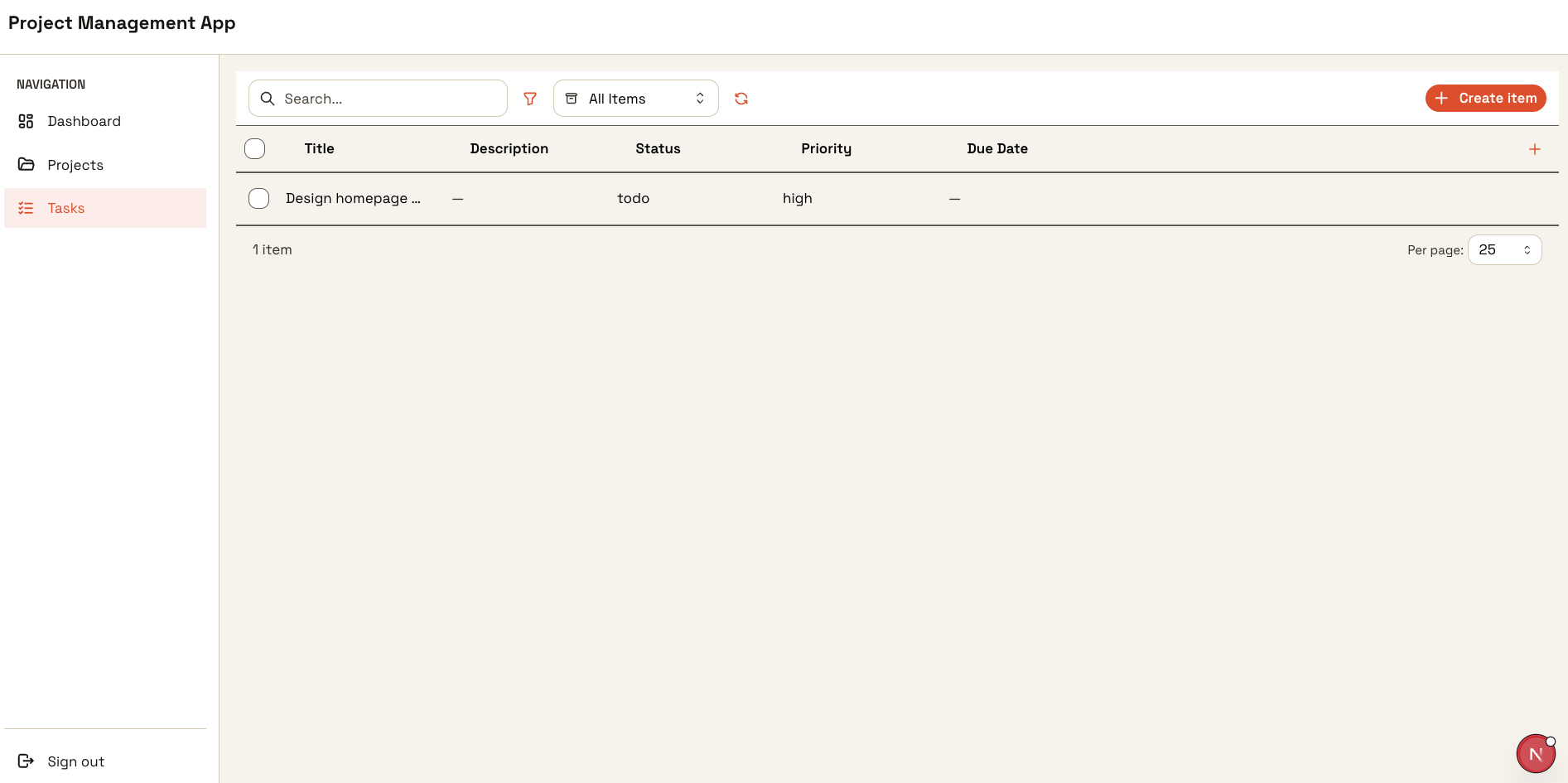
Open http://localhost:3000/content/tasks — you should see your seed tasks rendered in the table with sorting, search, and filter already working.
Explore the Tasks Detail Page
The /create-collection skill also generated the detail form at app/(authenticated)/content/tasks/[id]/page.tsx:
"use client";

import { use } from "react";
import { useRouter } from "next/navigation";
import { Group, Button } from "@mantine/core";
import { IconArrowLeft } from "@tabler/icons-react";
import { CollectionForm } from "@/components/ui";
import { isNewItem } from "@/lib/buildpad/utils";

export default function TaskDetailPage({
  params,
}: {
  params: Promise<{ id: string }>;
}) {
  const { id } = use(params);
  const router = useRouter();

  const handleSuccess = (data?: Record<string, unknown>) => {
    if (isNewItem(id) && data?.id) {
      router.push(`/content/tasks/${data.id}`);
    }
  };

  return (
    <div>
      <Group mb="md">
        <Button
          variant="subtle"
          leftSection={<IconArrowLeft size={16} />}
          onClick={() => router.push("/content/tasks")}
        >
          Tasks
        </Button>
      </Group>

      <CollectionForm
        collection="tasks"
        id={isNewItem(id) ? undefined : id}
        mode={isNewItem(id) ? "create" : "edit"}
        onSuccess={handleSuccess}
      />
    </div>
  );
}- Navigate to
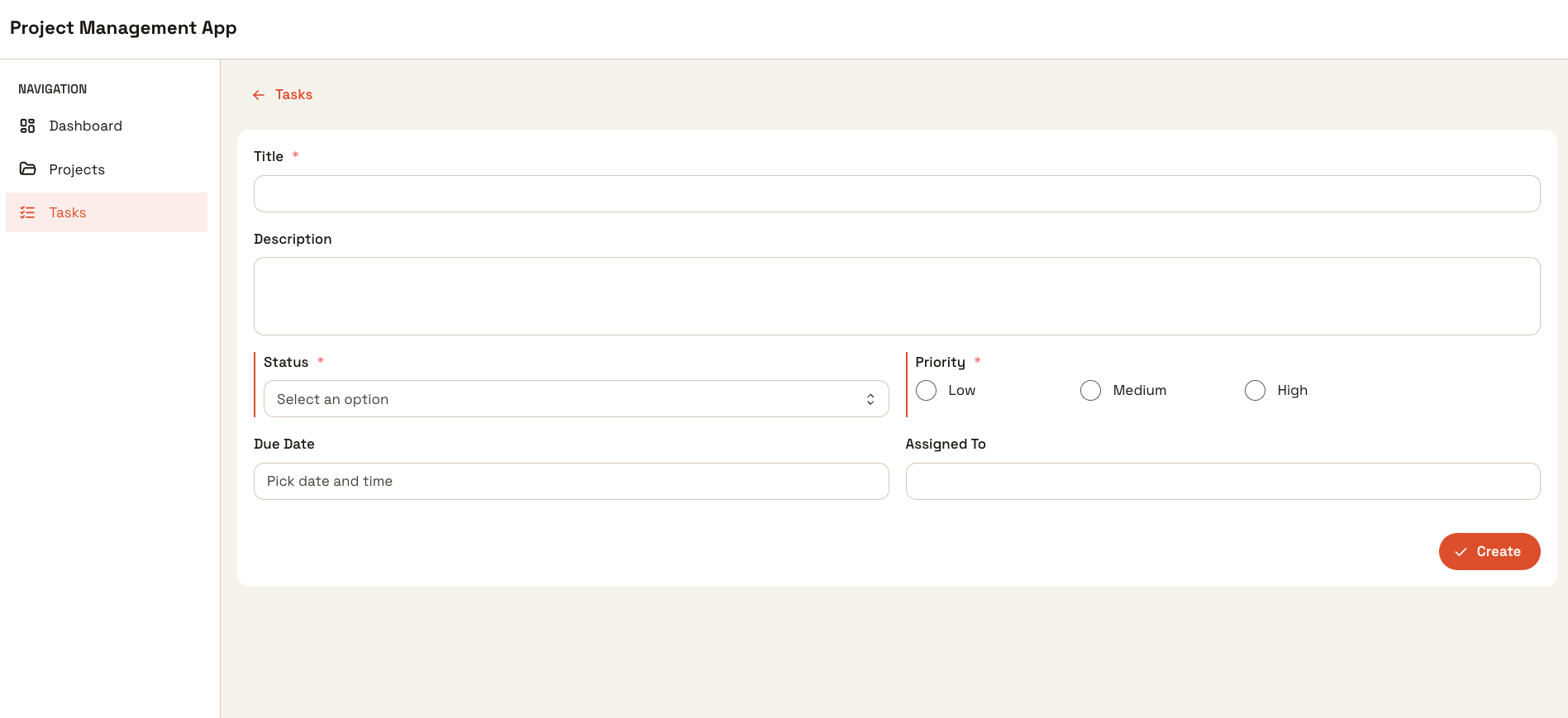
/content/tasks/+to create a new task — the+sentinel is handled byisNewItem(). - Navigate to
/content/tasks/<id>to edit an existing task. CollectionFormauto-renders the correct input for each field based on the interface type you defined in Tutorial 2.
Add Session Awareness with useAuth
The generated page.tsx gives every authenticated user the same experience. The useAuth hook is already installed at lib/buildpad/hooks/useAuth.ts — you just need to wire it in. A common pattern is hiding the create button from non-admin users.
Open app/(authenticated)/content/tasks/page.tsx and update it:
"use client";

import { useRouter } from "next/navigation";
import { CollectionList } from "@/components/ui";
import { useAuth } from "@/lib/buildpad/hooks/useAuth";

export default function TasksListPage() {
  const { isAdmin } = useAuth();
  const router = useRouter();

  return (
    <CollectionList
      collection="tasks"
      enableSearch
      enableFilter
      enableSelection
      enableCreate
      enableDelete
      enableSort
      enableResize
      enableReorder
      enableHeaderMenu
      archiveField="status"
      archiveValue="cancelled"
      unarchiveValue="todo"
      limit={25}
      onCreate={isAdmin ? () => router.push("/content/tasks/+") : undefined}
      onItemClick={(item) => router.push(`/content/tasks/${item.id}`)}
    />
  );
}
Passing onCreate={undefined} hides the create button entirely — CollectionList also checks collection permissions server-side, so non-admin users won’t see it regardless.
Verify the Sidebar Navigation
The Tasks link was already added to the sidebar when Tutorial 2 ran /create-collection. Open components/AppNavShell.tsx and confirm the NAV_ITEMS array includes a Tasks entry:
const NAV_ITEMS = [
  // ...other items
  { label: "Tasks", href: "/content/tasks", icon: IconChecklist },
];
Navigate to http://localhost:3000/content/tasks — the Tasks link in the sidebar should highlight automatically because Next.js Link matches the active path.
If the link isn’t highlighted, check that AppNavShell.tsx uses usePathname() to compare the current path against each item’s href.
Troubleshooting
Warning: Function components cannot be given refs (forwardRef)
If you see this warning in the browser console after running pnpm dev, it’s caused by a Mantine package version mismatch. The Buildpad stack requires all Mantine packages to be on v8, but @mantine/dates and @mantine/tiptap may have been installed at v9:
Show warning output
Warning: Function components cannot be given refs. Attempts to access this ref will fail.
    at DatePickerInput
Fix it by pinning both packages to v8:
Show fix command
pnpm add @mantine/dates@8 @mantine/tiptap@8Then restart the dev server.
Other common issues
| Symptom | Cause | Fix |
|---|---|---|
| Table shows “No records” despite seed data | Collection name mismatch | Check the collection prop matches the exact name in your DaaS backend |
| 403 error on data load | Auth token not forwarded | Ensure you’re inside the (authenticated) route group |
| Create button missing | enableCreate not set | Add enableCreate to CollectionList |
useAuth returns null user | Not inside AuthProvider | Confirm (authenticated)/layout.tsx wraps children in the provider |
What’s Next
You have working list and form pages. In the next tutorial you’ll lock down who can do what using role-based access control.